Butterfly: A Whimsical Font for Creative Projects
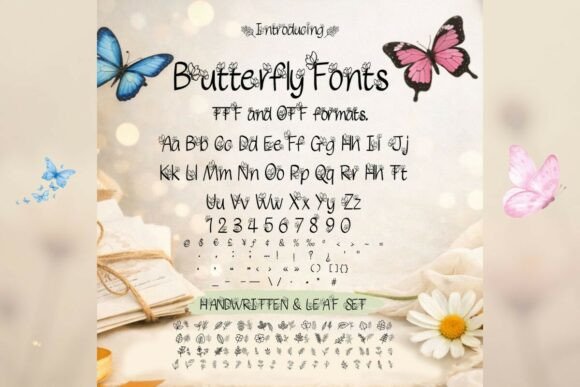
The world of design often relies on typography to set a mood. While sleek sans-serifs dominate modern interfaces, there is a growing appreciation for fonts that feel personal, organic, and whimsical. Enter the Butterfly font, a decorative script that captures the essence of nature. This typeface is not merely a collection of letters; it is an intricate system of handwritten strokes adorned with delicate butterflies, leaves, and floral motifs. It is designed specifically to bring a touch of charm and positivity to your work.
For creators ranging from hobbyist scrapbookers to professional stationery designers, Butterfly offers a unique aesthetic. It transforms standard text into art, making it ideal for planners, invitations, greeting cards, logos, and digital products. However, the beauty of a decorative font often masks its complexity. Using such an intricate typeface requires a different approach than using standard text fonts. To truly bring your projects to life with this nature-inspired style, you must understand how to navigate its specific challenges.
Understanding the Nature of Decorative Script
The primary appeal of the Butterfly font is its ability to mimic the fluidity of handwriting while adding ornamental flair. Unlike rigid serif or sans-serif fonts, this script relies on the "baseline shift"—the natural up-and-down motion of a hand holding a pen. The added illustrations of flora and fauna are integrated into the letterforms, meaning they appear as the text is typed. This automation is a massive time-saver for designers who might otherwise have to manually place these elements in Adobe Illustrator or Procreate.
However, this integration is where many users encounter their first hurdle. Because the Butterfly font includes high-detail vector paths, it carries a heavier visual weight. It is not designed for body text. Trying to use it for long paragraphs will result in a chaotic, unreadable mess that strains the eyes. The font is built for display purposes—short headlines, single words, or focal points. Recognizing this distinction is the first step toward using the font effectively. It is a tool for emphasis, not for information delivery.
Avoiding the "Wall of Ink" Effect
One of the most common mistakes beginners make with the Butterfly font is ignoring the importance of spacing. Because the letters are decorated with leaves and wings, the default tracking (space between letters) often feels tight. When you type a word like "Garden" or "Spring," the decorative elements of adjacent letters can collide, creating a visual blob.
The Better Approach:
Always adjust your tracking and kerning. In design software like Canva, Photoshop, or even Microsoft Word, increase the spacing between characters. This allows the intricate details of the Butterfly font to breathe. When the wings and leaves have room to stand out, the text becomes legible and elegant. A good rule of thumb is to increase tracking by +25 to +50, depending on the font size. This simple correction prevents your design from looking cluttered and ensures the whimsical nature of the typeface remains the focal point.
Contrast and Background Selection
Another frequent oversight is poor background selection. The Butterfly font is detailed. If you place it on a background that is equally busy—such as a loud floral wallpaper or a high-contrast geometric pattern—the text will get lost. The delicate strokes of the letters will blend into the background noise, rendering the message unreadable.
Practical Advice:
Treat the Butterfly font as the star of the show. It performs best on clean, solid backgrounds or subtle, soft textures. Pastels, creams, soft greys, and muted earth tones provide the perfect canvas. If you must use a patterned background, consider placing a semi-transparent shape (like a circle or rectangle) behind the text to create a buffer zone. This ensures that the charm of the font enhances the design rather than competing with it.
Color Psychology and Printing
When working with a nature-inspired style, color choice is critical. While the Butterfly font looks stunning in deep forest greens or rich chocolates, using pure black (hex code #000000) can sometimes appear too harsh against the soft, handwritten aesthetic. It can make the design feel slightly disconnected.
Instead, opt for "off-blacks" like charcoal or dark slate. These colors maintain readability while softening the overall look. Furthermore, if you are creating products for print—such as wedding invitations or greeting cards—be mindful of ink consumption. Because the Butterfly font is heavy with decorative strokes, it uses significantly more ink than a standard font. If you are printing at home, this can drain cartridges quickly. For commercial printing, ensure you check the cost implications of heavy ink coverage.
Context Matters: When to Use and When to Restrain
It is tempting to use the Butterfly font for everything once you download it. Its whimsical nature makes it perfect for specific contexts, but using it inappropriately can undermine your professional credibility.
Ideal Use Cases:
- Wedding Stationery: The floral motifs are perfect for romantic save-the-dates.
- Children’s Branding: It conveys playfulness and innocence.
- Quotes and Social Media Graphics: It adds personality to inspirational text.
- Planners and Journals: It adds a decorative touch to headers.
Cases to Avoid:
- Legal Documents: The legibility is too low for fine print.
- Corporate Tech Logos: It clashes with the sleek, modern feel of the tech industry.
- Small Digital Text: On mobile screens, the details will blur into pixels.
Licensing and File Quality
Before you integrate the Butterfly font into your business branding or digital products, you must verify the licensing. This is a detail that many small business owners overlook. There is a significant difference between a "Personal Use" license and a "Commercial Use" license.
If you use a font marked for personal use in a logo for a client or a product you sell on Etsy, you could face legal issues or fines. Always read the readme file included with the download. Ensure that the version of Butterfly you possess grants you the rights to use it for your intended purpose. If you are selling digital planners or invitations where the font is embedded, a commercial license is almost always required.
Pairing Fonts for Balance
A design composed entirely of the Butterfly font will lack hierarchy. To create a professional layout, you need to pair it with a secondary typeface. Because Butterfly is a script font with high ornamentation, it requires a simple partner.
A clean sans-serif (like Montserrat, Open Sans, or Lato) works best. These fonts are neutral and recede visually, allowing the Butterfly text to stand out. For example, if you are designing a planner page, use Butterfly for the month's name, but use a standard sans-serif for the days of the week. This contrast creates a visual rhythm that is pleasing to the eye and functional for the user.
Final Thoughts on Quality and Satisfaction
The Butterfly font is more than just a typeface; it is a design asset that brings joy and nature into digital and physical spaces. By avoiding the common pitfalls of over-cluttering, ignoring spacing, and mismanaging context, you can leverage this font to its full potential. Whether you are a freelancer creating a brand identity or a hobbyist decorating a journal, the key is balance. Let the delicate butterflies and leaves enhance your message, not obscure it. When used with care and attention to detail, this font can elevate your work from simple text to a memorable visual experience.