The Modern Thin Bundle: Achieving Elegant Typography Without Sacrificing Clarity
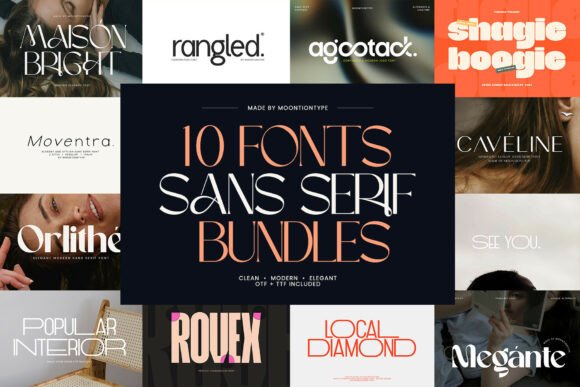
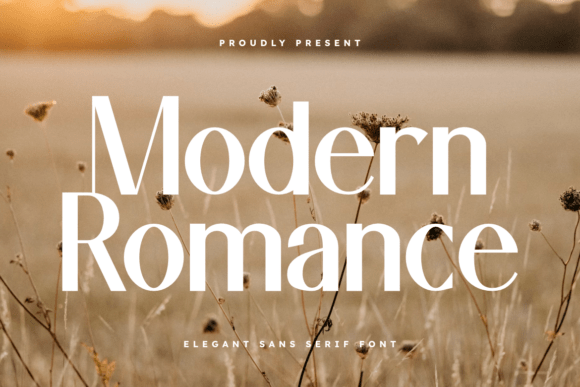
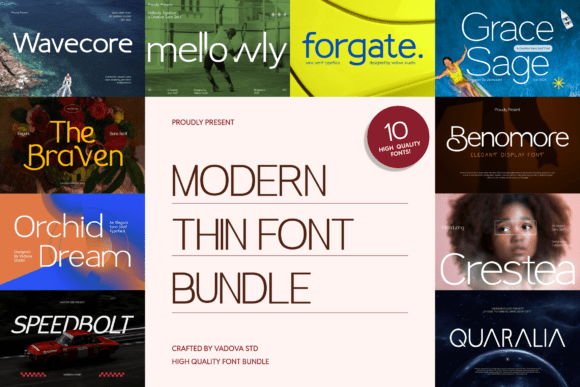
In the world of digital design and branding, the visual weight of your text speaks volumes before a single word is read. The Modern Thin Bundle has emerged as a sophisticated solution for creators seeking that elusive balance between minimalism and presence. It is a curated collection of lightweight typefaces designed to inject a sense of airy elegance into projects ranging from high-fashion lookbooks to sleek corporate websites. However, while the aesthetic appeal of ultra-thin typography is undeniable, integrating these fonts into a professional workflow requires more than just downloading and dragging them into your layout.
Many designers, entrepreneurs, and marketers find themselves drawn to the "thin" aesthetic because it signals modernity and exclusivity. Yet, the path from admiration to effective application is often fraught with technical pitfalls. To truly leverage the power of a Modern Thin Bundle, one must navigate the nuances of legibility, rendering, and hierarchy with a corrective eye toward common industry oversights.
The Allure and the Trap of "Ultra-Thin" Aesthetics
There is a pervasive misunderstanding that "thin" equates to "light" in terms of visual impact. While a thin font certainly reduces visual clutter, it does not inherently guarantee a clean design. In fact, one of the most common mistakes beginners make when using a Modern Thin Font Bundle is prioritizing style over substance. They select a delicate, hairline typeface for a website hero section or a business card without testing how it renders across different devices or print mediums.
The result is often a design that looks stunning on a high-resolution Retina display but becomes an illegible blur on a standard mobile screen or when printed on textured card stock. This oversight can severely damage the user experience (UX) and brand perception. If your audience has to squint to read your value proposition, you have already lost them. The goal of the Modern Thin Bundle is not to hide the message, but to present it with understated confidence.
Avoiding the Legibility Pitfall
The primary concern with lightweight typography is legibility. Thin strokes have less physical ink or pixel coverage, which means they are more susceptible to disappearing into the background. A critical error is pairing these delicate fonts with low-contrast color schemes. For instance, using a light grey thin font on a white background is a recipe for visual fatigue.
The Better Approach: Always ensure high contrast. If you are using a font from the Modern Thin Bundle, pair it with a solid, dark background or ensure the font color is sufficiently deep against a light canvas. Furthermore, pay attention to font size. Thin fonts generally require a larger point size than their medium or bold counterparts to achieve the same level of readability. Do not be afraid to scale up your thin headings; the extra white space created by the lightweight strokes will actually enhance the "premium" feel you are trying to achieve.
Technical Realities: Rendering and Resolution
Not all screens are created equal. A font that looks crisp on a designer’s 4K monitor may look jagged or broken on a standard 1080p laptop screen. This is a technical reality that often gets overlooked during the creative phase. When you invest in a Modern Thin Bundle, you are investing in vectors, but the final output is rasterized pixels.
Many creators make the mistake of using hairline weights for body text or critical navigation elements. While this might look editorial and chic in a static mockup, it fails in dynamic digital environments where users scroll quickly or view content at various zoom levels.
Practical Advice: Reserve the ultra-thin weights for display purposes—large headlines, hero quotes, or monograms where the font size is substantial (usually above 24pt). For body text or smaller UI elements, utilize the "Regular" or "Light" weights often included in a comprehensive Modern Thin Bundle. These weights maintain the elegant, minimalist structure of the family but offer enough heft to remain readable at smaller sizes.
Pairing and Hierarchy: The Art of Contrast
Another frequent misstep is attempting to create a design entirely composed of thin typography. While monochromatic weight schemes can be stylistic, they often lack the necessary hierarchy to guide the viewer’s eye. If every element is thin, nothing stands out, and the layout feels flat.
When working with the Modern Thin Bundle, you must create tension and balance. Thin fonts crave contrast. They perform best when paired with a secondary typeface that has a bit more weight or a completely different structure, such as a sturdy sans-serif or a classic serif.
Example of Better Choice: Imagine you are designing a landing page for a luxury skincare brand. Instead of using a thin font for both the headline and the paragraph text, use the bold or regular weight from a complementary sans-serif for the body copy. Use the elegant thin font from your bundle exclusively for the main headline and specific accent text. This creates a visual hierarchy that guides the reader from the striking headline to the informative body text without losing the sophisticated aesthetic.
Evaluating the Bundle: What to Check Before You Commit
Before downloading or purchasing a Modern Thin Bundle, it is essential to evaluate the technical specifications to ensure it meets professional standards. A common mistake is assuming all font bundles are created equal. Poorly constructed fonts can lead to kerning issues (uneven spacing between letters) which are particularly noticeable in thin typography where white space is a dominant design element.
Here is a checklist to ensure you are making a sound investment:
- Character Set Completeness: Does the bundle include extended Latin characters, numbers, and essential punctuation? If you are creating content for international markets, missing diacritics can render your text unprofessional.
- File Formats: Ensure the bundle includes web-friendly formats (WOFF2, WOFF) for digital use and desktop formats (OTF, TTF) for print and design software.
- OpenType Features: Look for features like ligatures and stylistic alternates. These allow you to customize the look of the text, adding unique flair to logos or headers.
- Variable Font Support: Some modern bundles offer variable font files. This is a massive advantage as it allows you to fine-tune the exact weight of the font, finding the perfect balance between "thin" and "invisible" for your specific context.
Context is King: Matching Fonts to Mediums
A final, often ignored detail is the context of the medium. A Modern Thin Font Bundle is versatile, but it is not a universal solution for every project. Using these fonts for a construction company’s heavy-duty equipment brochure or a children’s educational book would likely be a mismatch in tone and function.
These typefaces are engineered for specific environments: fashion, luxury goods, architecture, high-end hospitality, and minimalist tech. When applied correctly, they communicate precision, clarity, and modernity.
The Solution: Always step back and ask if the "thinness" supports the message. If the goal is to convey stability and strength, a thin font may undermine that. If the goal is to convey precision and elegance, the Modern Thin Bundle is the perfect tool.
Final Thoughts on Professional Application
Mastering the Modern Thin Bundle is about understanding the relationship between space, weight, and clarity. By avoiding the common traps of low contrast, poor hierarchy, and inappropriate sizing, you can transform these lightweight typefaces into powerful assets for your brand or client work. Use them to create breathing room in your layouts, to highlight key information with grace, and to build a visual identity that feels undeniably current and professional.