Wavy Brick: Integrating Dynamic Brush Script into Your Design Workflow
In the crowded landscape of digital assets, selecting the right typography is a strategic decision that impacts the entire trajectory of a project. Wavy Brick, a dynamic brush script display font, offers more than just a stylistic choice; it provides a specific visual language characterized by bold movement, expressive curves, and a natural hand-drawn aesthetic. Understanding how to integrate this type of asset effectively requires looking beyond the surface level and examining how its rough brush texture and flowing letterforms interact with modern design workflows, from initial branding concepts to final merchandise production.
Defining the Asset: Characteristics and Technical Profile
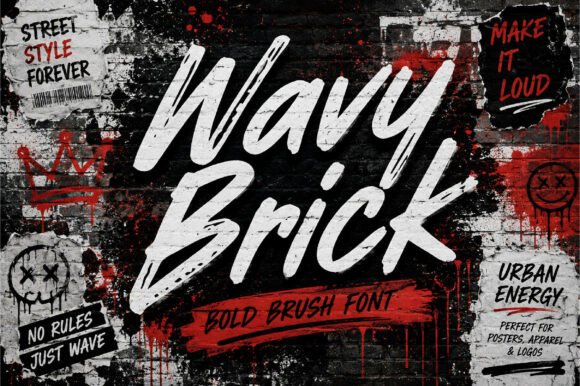
Before implementation, it is necessary to understand the technical and stylistic nature of Wavy Brick. It is classified as a display font, meaning it is engineered for impact at larger sizes rather than legibility in body text. The defining features of this font include its energetic brush strokes and a rough texture that mimics ink on paper or paint on a surface. This creates an "attitude" that feels confident and artistic.
For creators, this means Wavy Brick is not a replacement for standard sans-serif or serif fonts used in paragraphs. Instead, it serves as the focal point of a composition. Its compatibility with both print and digital environments makes it a versatile tool, but its high-contrast nature requires careful handling regarding spacing and alignment to maintain readability while preserving its chaotic, handcrafted charm.
Strategic Placement in the Creative Process
Integrating Wavy Brick effectively requires a clear understanding of where it fits within a broader workflow. Typography selection should ideally occur during the conceptualization phase, not as an afterthought.
Phase 1: Concept and Mood Boarding
When initiating a project for streetwear, music artwork, or modern branding, the visual tone is set early. Wavy Brick is best introduced during the mood boarding stage. If the project goal is to convey movement, street culture, or a "raw" aesthetic, this font serves as an anchor. By placing it alongside photography and color palettes early on, designers can verify if the bold, expressive curves align with the intended message. This prevents the common workflow bottleneck of forcing a generic font to fit a specific vibe later in the process.
Phase 2: Application and Layout Execution
During the execution phase, Wavy Brick interacts with other design elements. Because the font has a strong personality, it dictates the hierarchy. In a poster design or social media graphic, the text set in Wavy Brick usually acts as the primary focal point. Consequently, supporting elements—such as body copy or secondary information—should utilize simpler, cleaner fonts (like a geometric sans-serif) to create contrast. This pairing ensures that the expressive nature of the brush script enhances rather than overwhelms the layout.
Practical Implementation Across Mediums
The utility of Wavy Brick extends across various industries and platforms. Its adaptability is one of its strongest workflow advantages, allowing for consistency across different consumer touchpoints.
Branding and Logo Design
For entrepreneurs and small business owners, a logo is the cornerstone of identity. Wavy Brick offers a solution for brands that want to avoid corporate sterility. When used in logo design, the font provides an immediate sense of personality and approachability. However, implementation requires attention to vectorization. Because of the rough brush texture, designers must ensure that the letterforms scale correctly without losing their intricate details, particularly when moving from a digital screen to physical signage.
Product Packaging and Merchandise
In the realm of product packaging and merchandise, such as t-shirts or tote bags, texture is king. Wavy Brick translates exceptionally well to physical goods because its hand-drawn style implies a human touch. For creators managing the production process, this font helps differentiate products on a shelf or in an online store. It is particularly effective for limited edition drops or special releases where the typography needs to signal exclusivity and creativity.
Digital and Social Media Assets
For marketers and content creators, the speed of consumption on social media is a challenge. Wavy Brick addresses this by offering high visual impact that stops the scroll. Its modern look fits well with video thumbnails, Instagram stories, or event posters. When integrating this font into digital templates, it is important to maintain consistent usage rules—such as specific color overlays or drop shadows—to ensure that the brand's digital presence remains cohesive across multiple posts and platforms.
Integration with Tools and Team Collaboration
A font does not exist in a vacuum; it interacts with software and people. Wavy Brick is compatible with standard design software like Adobe Illustrator, Photoshop, and Canva. However, because of its stylistic density, it requires specific handling.
When working within a team, establishing a style guide is essential. This guide should dictate how Wavy Brick is used. For example, it might specify that the font is only used for H1 headers or logo marks, never for user interface buttons or technical data. This prevents misuse by team members who may not have a design background but are responsible for creating internal documents or social posts. Furthermore, when exporting files for web use, optimizing the font file size ensures that it does not negatively impact website loading speeds, maintaining a balance between aesthetic appeal and technical efficiency.
Workflow Optimization and Long-Term Use
Adopting a distinct font like Wavy Brick is an investment in a visual asset library. To maximize this investment, creators should treat it as a long-term asset rather than a one-off solution.
One practical tip for workflow efficiency is to create pre-set templates. Since Wavy Brick works best with specific layouts, saving templates for recurring needs—such as weekly social media graphics or monthly newsletter headers—saves time. This allows the creator to focus on the message rather than re-arranging elements every time.
Additionally, quality control is vital. Before finalizing a project, it is necessary to view the typography at its intended output size. A design that looks bold and readable on a monitor might become muddy on a low-resolution print. Testing the font against different backgrounds and lighting conditions ensures that the "rough brush texture" remains a feature, not a defect, in the final product.
Conclusion
Wavy Brick is more than a collection of vector paths; it is a tool for adding movement, attitude, and handcrafted charm to a wide array of projects. By understanding its technical nature and strategically placing it within the creative workflow, professionals and hobbyists alike can leverage this font to create impactful branding, merchandise, and digital content. The key to successful implementation lies in balancing its expressive energy with sound design principles, ensuring that the typography not only looks stylish but also serves the practical goals of the project.